
Update Record
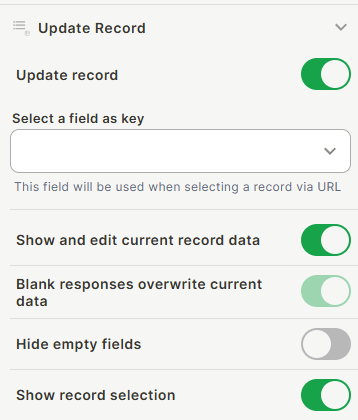
Update Record is a Form Tool that makes the form edit an existing record instead of always creating a new one. When enabled, you define which field is used as the key to identify the record — typically passed via URL — and control how existing data is displayed and handled during editing.
Capabilities
- Enable or disable record update mode for the form
- Select a key field used to identify which record to update via URL
- Pre-fill the form with the current record's data
- Control whether blank responses overwrite existing data
- Hide fields that have no value in the current record
- Allow or prevent users from selecting which record to update
How to configure
Step 1
Enable Update Record: Turn on the Update record toggle. Additional settings will appear.
Step 2
Select a field as key: Open the dropdown and choose the field that will be used to identify the record when the form is opened via URL. The value of this field must be passed in the URL so the form knows which record to load and update.
Step 3
Configure the remaining options:
- Show and edit current record data — When enabled, the form pre-fills with the existing values of the record, letting the user see and edit current data. When disabled, the form opens empty even if the record already has values.
- Blank responses overwrite current data — When enabled, if the user leaves a field empty and submits, the existing value in that field will be cleared. When disabled, empty submissions are ignored and the original value is preserved.
- Hide empty fields — When enabled, fields that have no value in the current record are hidden from the form. Useful for keeping the editing experience clean.
- Show record selection — When enabled, allows the user to select which record they want to update directly from the form, instead of relying on the URL to define it.
Step 4
Save: Click Save to apply the settings.
Keep in Mind
- Update Record does not work without a key field configured — the form needs a way to identify which record to load.
- If Blank responses overwrite current data is enabled, users can accidentally erase existing data by submitting a field without a value.
- The key field value is passed via URL. If the URL does not contain the expected value, the form may not load the correct record.
FAQ
1 — Can I use Update Record and still allow new record creation?
No. When Update Record is enabled, the form operates in edit mode. It will look for an existing record to update based on the key field. To support both creation and editing, you would need two separate forms.
2 — What happens if the URL does not contain a valid key field value?
The form will not be able to identify a record to update. The behavior in this case depends on whether Show record selection is enabled — if it is, the user can manually select a record; if not, the form may open without pre-filled data or fail to load correctly.
3 — Which field type should I use as the key field?
Any field that uniquely identifies a record works. A unique ID field or a field that is passed predictably through URLs is the most reliable choice.
Updated 15 days ago