
Link Field
The Link field stores any text as a clickable URL, making it easy to access external websites and pages directly from a record.
For instructions on how to access field types or how to add one, see Field Types.
Capabilities
- Store any URL as a clickable link
- Mark the field as required to enforce data entry
- Add a tooltip to guide users on what to enter
- Works with any valid URL format (websites, WhatsApp links, profile pages, internal links, etc.)
How to create a Link field
Step 1 — In table mode, click the + button on the last column header to add a new field.
Step 2 — Select Link from the field type list.
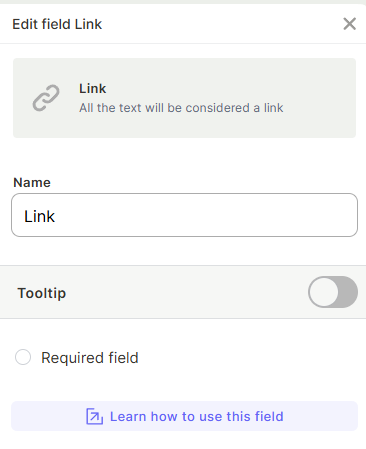
Step 3 — Enter a name for the field.
Step 4 (optional) — Enable Tooltip to add a hint for users filling in the field.
Step 5 (optional) — Check Required field if the field must be filled before saving a record.
Step 6 — Click Create.
Use cases and examples
- A Leads table storing each company's website URL for quick access
- A Clients table with a direct link to each client's WhatsApp conversation
- An Employees table linking to each person's LinkedIn or internal profile page
- A Projects table referencing external resources, docs, or dashboards
- A Tasks table with a direct link to the related Jestor record or internal page for quick navigation
Keep in mind
- The field does not validate whether the URL actually exists or is reachable — it only stores the text as a link.
- It does not automatically format or clean up the URL (e.g., adding
https://if missing).
FAQ
1- Can I store multiple links in a single Link field?
No. The Link field stores one URL per record. To store multiple links, create additional Link fields or use a text field with a list format.
2- Does the field check if the URL is valid before saving?
No. The field accepts any text as a link. It does not validate whether the URL is correctly formatted or leads to an active page.
3- What happens if I leave out the https:// from the URL?
The link may not open correctly. Always include the full URL with the protocol (e.g., https://) to ensure it works as expected.
Updated 6 months ago