
Calculate the Estimated Time for a Task Based on the Description
This action uses Jestor AI to read a task description and estimate how long it will take to complete. The result is saved directly into a field of your choice.
When to Use
- You manage tasks or projects and want an automatic time estimate based on what each task involves
- You want to reduce manual effort when planning sprints or work queues
- You are building a task management flow and need estimated hours populated automatically
How to Configure
Step 1
Create a new automation: This page covers only the action. For instructions on how to access automations and create a new one, see the Automations page.
Step 2
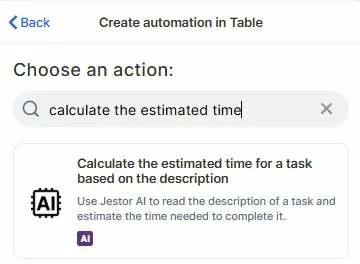
Choose the action: In the action search bar, type calculate the estimated time and select Calculate the estimated time for a task based on the description.
Step 3 (optional)
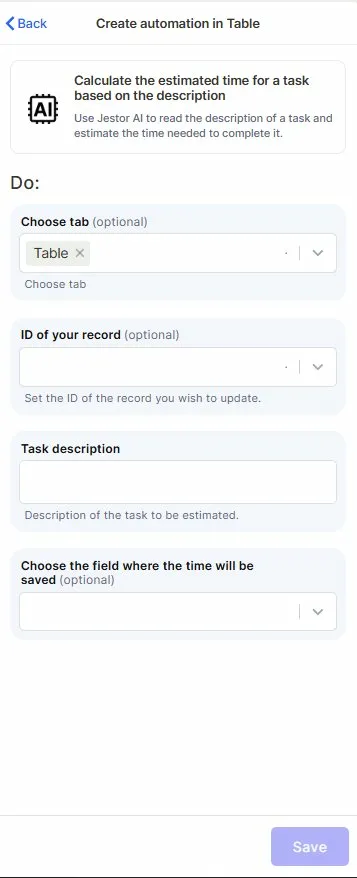
Choose tab: Select the table that contains the task records you want to process.
Step 4 (optional)
ID of your record: Map the field that holds the ID of the record you want to update with the estimated time.
Step 5
Task description: Map the field that contains the task description. This is the text Jestor AI will read to generate the estimate.
Step 6 (optional)
Choose the field where the time will be saved: Select the field where the estimated time output will be stored.
Step 7
Save: Click Save to apply the automation.
Keep in Mind
- This action does not break down the estimate into hours, minutes, or days automatically — the output format depends on how the AI interprets the description.
- It does not consider team capacity, deadlines, or workload when calculating the estimate — it only reads the task description.
- If the task description is vague or too short, the estimate may be imprecise or generic.
- The action does not update multiple records at once — it runs per record based on the trigger you configure.
- It does not validate whether the output field type is compatible — make sure the destination field can store text or numeric output as needed.
FAQ
1 — What kind of output does this action produce?
Jestor AI returns a time estimate based on the description content. The output is text-based, so the result may be something like "approximately 2 hours" depending on what the description says.
2 — Can I use this action without mapping the ID field?
Yes, the ID field is optional. However, mapping it is recommended if you want to make sure the result is saved to the correct record.
3 — Will it work if the description field is empty?
The action will still run, but the estimate will likely be empty or inaccurate since there is no content for the AI to read.
4 — Can I use a formula field as the task description input?
Yes, as long as the formula field outputs text that the AI can read.
5 — Does this action work in any language?
The action is designed to process text input, so it can handle descriptions in different languages. However, results may vary depending on the language and how clearly the task is described.
Updated 7 months ago