
Stage Indicator
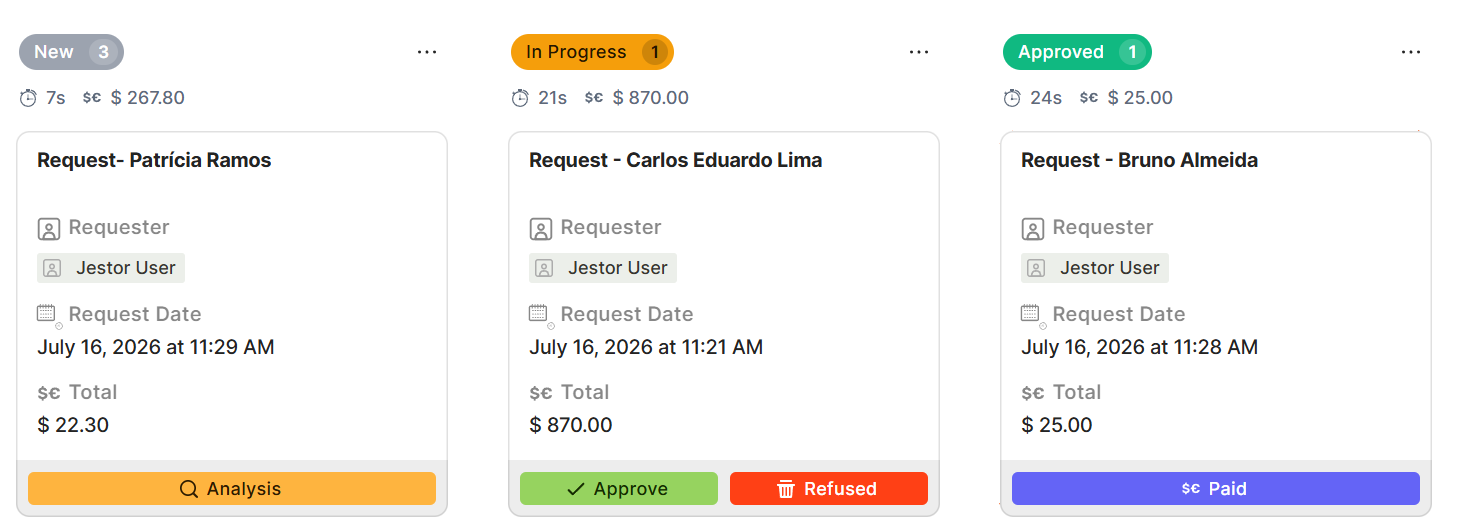
Stage Indicators turn your kanban into a live dashboard. Track time in stage with the built-in Stage SLA, or build your own custom indicators — sums, counts, averages, and more — from any field in your table, displayed right at the top of each column.
Capabilities
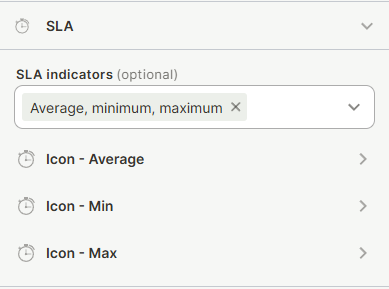
- Display the total average, maximum, or minimum time records have spent in each stage (Stage SLA)
- Create custom indicators from any table field, using Sum, Count, Average, Minimum, and Maximum operations
- Combine more than one operation on the same field within a single indicator
- Add multiple custom indicators to the same kanban, each pulling from a different field
- Apply a filter to each indicator so it only counts matching records within the stage
- Customize each indicator's icon (system icon or emoji), display style, and background color
- Pin indicators to the top of the column so they stay visible while scrolling
Use Cases and Examples
- In a CRM pipeline kanban, show the total value of open opportunities (Sum) alongside the average win probability (Average) for each stage.
- In a project management kanban, count how many cards in each stage are marked High priority, next to the built-in Stage SLA showing average time in stage.
- In an approval workflow kanban, show the total amount pending approval (Sum), the number of tickets awaiting a specific approver (Count with a filter), and the amount still pending overall.
How to configure
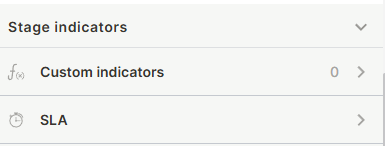
Open the kanban block in edit mode and scroll down to the Stage Indicators section.
Stage SLA
Toggle Stage SLA on to display a time metric at the top of each stage column. When enabled, each column shows the total average, maximum, or minimum time records have spent in that stage. Leave it toggled off to hide it.
Custom Indicators
Step 1
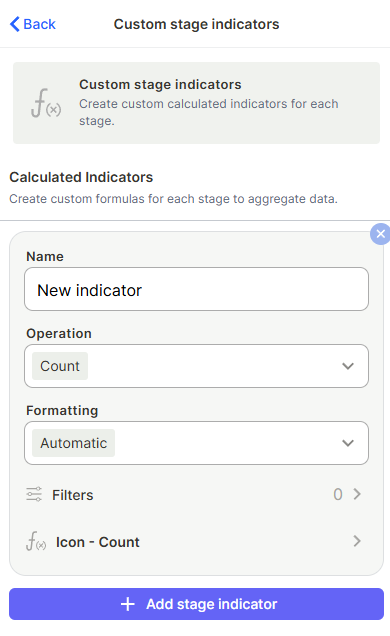
Click + Add stage indicator to create a new custom indicator.
Step 2
Name: enter a label to identify the indicator.
Step 3
Value: select the field (variable) the indicator will calculate, for example an opportunity value or a probability field.
Step 4
Operation — choose one or more operations to apply to the selected field: Sum, Count, Average, Minimum, or Maximum. All operations selected within the same indicator apply to that same field.
Step 5 (optional)
Filter: narrow down which records in the stage are counted, the same way filters work elsewhere in Jestor (for example, only records where Priority is High).
Step 6 (optional)
Format: set the number formatting used to display the result.
Step 7
Icon: choose an icon or emoji to represent the indicator, and pick between showing just the icon or the icon together with its name. You can also set a background color for the icon.
Step 8 (optional)
Repeat these steps to add another indicator using a different field. Each indicator has its own name, value, operation(s), filter, format, and icon.
Pin to top
Toggle this on to keep the indicator fixed at the top of the column at all times, regardless of scroll position. When off, the indicator scrolls out of view along with the rest of the column's content — useful if the column has many indicators and limited screen space.
Keep in Mind
- Indicators do not update instantly when a record moves between stages. Recalculation is asynchronous and currently takes around 5 minutes, especially in stages with a large volume of records. Hover over an indicator to see the full label and the timestamp of its last update — this works even if the indicator is minimized to show only its icon.
- Stage SLA does not take kanban filters into consideration — it calculates metrics from all records in the stage, not just the ones currently visible.
- Stage SLA only calculates metrics from records created after the toggle was turned on. Records that existed before enabling Stage SLA are not included in the calculation.
- Stage SLA tracks time at the stage level, not at the individual record level — it shows an aggregate metric per column, not per card.
- A custom indicator's filter only affects which records are counted toward that indicator — it does not hide or filter the cards displayed in the kanban.
- When more than one operation is selected for the same custom indicator, all operations use the same field. To calculate different fields, create separate indicators.
FAQ
1 — Does Stage SLA affect how records behave or get saved?
No. Stage SLA is a read-only display metric. It does not modify records or change how data is stored.
2 — Can I add more than one custom indicator to the same kanban?
Yes. You can add as many custom indicators as needed, each with its own field, operation(s), filter, and icon.
3 — Why does an indicator show an outdated number right after I move a card?
Indicators recalculate asynchronously and can take a few minutes to update (currently around 5 minutes) particularly in stages with a large number of records. Hover over the indicator to check the time of its last update before assuming something is wrong.
4 — Can I use the same field for two different operations, like sum and average?
Yes. If you select more than one operation for an indicator, all of them are calculated on the same field you selected for that indicator.
5 — Do custom indicator filters affect which cards are visible in the kanban?
No. A filter set on a custom indicator only changes which records are counted in that indicator's calculation. It does not hide or filter the cards shown in the column.
Updated 15 days ago