
Image
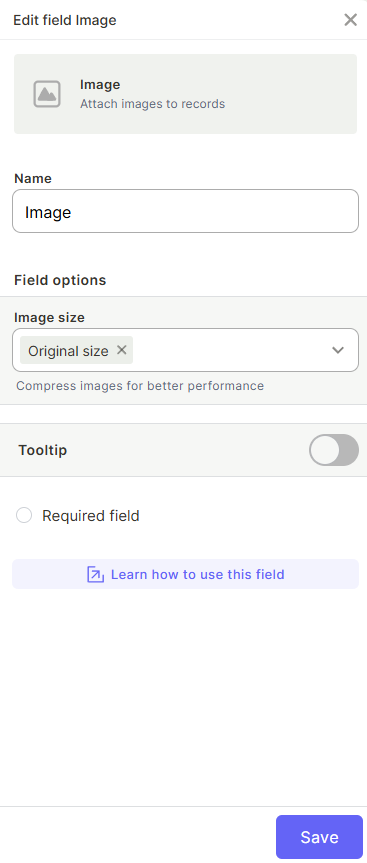
The Image field lets you attach one or more images directly to a record. It works like the Files field, but exclusively for pictures. It's useful for storing visual references such as product photos, profile pictures, event photos, or any image that needs to be associated with a record.

For instructions on how to access field types or how to add one, see Field Types.
Capabilities
- Attach one image to a record
- Control image compression through size settings (Original, Large, Medium, or Small)
- Mark the field as required to enforce image upload before saving
- Add a tooltip to guide users on how the field should be used
Configuration
Name — Enter a label for the field that will appear in the table and on records.
Image size — Choose how uploaded images are stored:
- Original size — Keeps the image at its original resolution with no compression
- Large — Compresses the image to 2048px
- Medium — Compresses the image to 1080px
- Small — Compresses the image to 720px
Tooltip — Enable to add a helper text that appears when a user hovers over the field.
Required field — Enable to make uploading an image mandatory before saving a record.
Use Cases and Examples
Product catalog — In a Products table, attach a photo to each product record so your team can visually identify items without leaving the table.
Maintenance forms — In a Maintenance Forms table, let clients attach a photo of the device that needs to be repaired, giving technicians visual context before the visit.
Team directory — Store profile pictures in a People table to make records easier to identify at a glance.
Company events — Use an Image field to attach event photos to each event record, keeping visual documentation organized alongside other record data.
Keep in Mind
- Compression settings apply at upload time. Changing the image size setting after images have already been uploaded does not affect previously stored images.
- The Image field only accepts image files. For other file types, use the Files field instead.
FAQ
1- Can I download images attached to a record?
Yes. Images can be downloaded directly from the record in their original format.
2- What is the difference between the Image field and the Files field?
Both allow attaching files to a record, but the Image field only accepts image files. The Files field accepts any file type.
3- Does changing the image size setting affect existing images?
No. The compression setting only applies to images uploaded after the change. Previously uploaded images are not affected.
4- Can I use the Image field in automations?
Image fields have limited support in automations. You can reference them in conditions but cannot use them as values to set in update actions.
5- Can I make the Image field required?
Yes. Enabling the required option forces users to upload at least one image before saving the record.
Updated 6 months ago