
Review Code Snippet for Errors
A Jestor AI action that analyzes a code snippet stored in a record and returns a list of probable errors. The result is saved directly into a field of your choice, making it easy to integrate code review into automated workflows.
When to Use
- You store code snippets in Jestor records and want automated error detection
- You are building a development workflow that requires a quick review step before deploying or approving code
- You want to reduce manual review effort by flagging likely issues automatically
How to Configure
Step 1
Create a new automation: This page covers only the action. For instructions on how to access automations and create a new one, see the Automations page.
Step 2
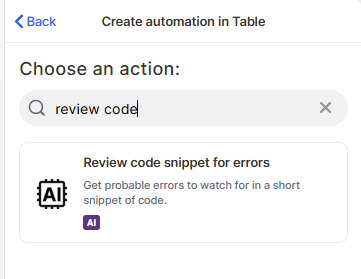
Choose the action: In the action search bar, type review code and select Review code snippet for errors.
Step 3
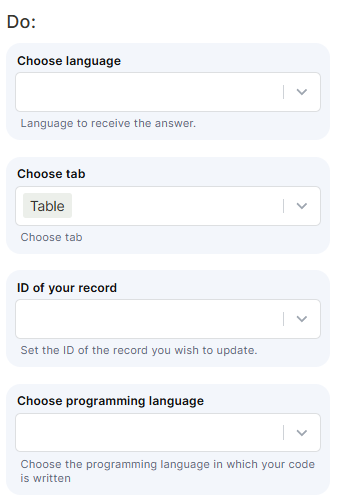
Choose language: Select the language in which the AI response will be returned. This controls the language of the output text, not the programming language of the code.
Step 4 (optional)
Choose tab: Select the table that contains the records with the code snippets.
Step 5
ID of your record: Map the field that holds the ID of the record you want to update with the review output.
Step 6
Choose programming language: Select the programming language of the code snippet. This helps the AI interpret the code correctly.
Step 7
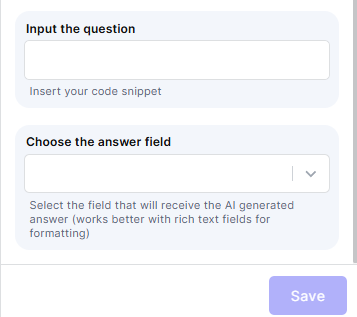
Input the question: Map the field that contains the code snippet to be reviewed. This is the code the AI will analyze.
Step 8 (optional)
Choose the answer field: Select the field where the AI-generated review will be saved. Rich text fields work best for formatting.
Step 9
Save: Click Save to apply the automation.
Keep in Mind
- This action does not fix or rewrite the code — it only identifies probable errors. No corrected version is returned.
- The action does not execute or compile the code. The review is based on static analysis by the AI, not runtime behavior.
- The output is saved into a single field. The action does not split findings into separate fields per error.
- The AI cannot guarantee all errors will be caught. Results depend on the complexity and clarity of the snippet provided.
- This action is designed for short snippets. Very long or complex code blocks may produce incomplete or less accurate results.
- Selecting the wrong programming language may cause the AI to misinterpret syntax and return inaccurate results.
FAQ
1 — Does this action fix the errors it finds?
No. The action only lists probable errors. It does not rewrite, correct, or suggest specific fixes to the code.
2 — Can I use this action with any programming language?
You can select the programming language manually in the configuration. The AI will attempt to analyze the snippet based on that selection, but results may vary for less common languages.
3 — Where is the review output saved?
The output is saved into the field you select in the Choose the answer field step. Rich text fields are recommended for better formatting of the results.
4 — Does the action run the code to find errors?
No. The AI performs static analysis only. It does not execute the code or simulate runtime behavior.
5 — What happens if I leave the answer field empty?
If no answer field is selected, the output will not be saved anywhere. Make sure to map a field to capture the review result.
Updated 7 months ago