
App Blocks
Blocks are widgets you can add to any app or dashboard in Jestor. They go far beyond charts — you can use them to create buttons, display calendars, show filtered tables, build indicators, and more.
What's a block?
A block is a modular widget that lives inside an app or dashboard. Each block has its own functionality and can be configured independently. Common uses include charts, KPI indicators, buttons, calendars, and data tables.
Capabilities
- Display data as charts, indicators, or tables
- Filter and segment information directly in the dashboard
- Create action buttons
- Visualize records in a calendar view
- Combine multiple blocks to build rich, custom dashboards
How to add a block
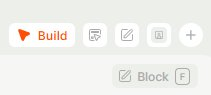
To add a block, you first need to enter Build mode — press B or click the Build button in the top bar. Once in Build mode, click Block in the toolbar or press F to insert a new block into the current app or dashboard.
Updated 7 months ago