
Roll-up
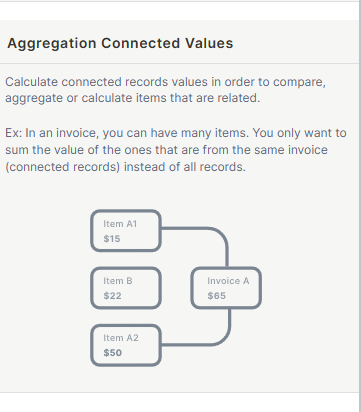
A Roll-Up field calculates aggregated values from records in a connected (child) table. Use it to sum, count, or otherwise aggregate data across related records without leaving the parent table.
For instructions on how to access field types or how to add one, see Field Types.
Capabilities
- Aggregate numeric values from connected records using formulas like Sum, Average, Min, Max, and Count.
- Filter which records are included in the calculation using optional conditions.
- Format the result as a number with custom formatting options.
Use Cases and Examples
- Sales teams can use Roll-Up to sum the total deal value of all opportunities linked to a given account, giving a quick view of revenue potential per client.
- Project managers can count the number of tasks linked to each project record to track workload or completion progress at a glance.
- Finance teams can calculate the average or total of invoice amounts connected to a customer record, filtered to include only unpaid invoices.
- Operations teams can use Min or Max to surface the earliest or latest deadline among all tasks linked to a process record, without leaving the parent table.
How to Configure
Step 1
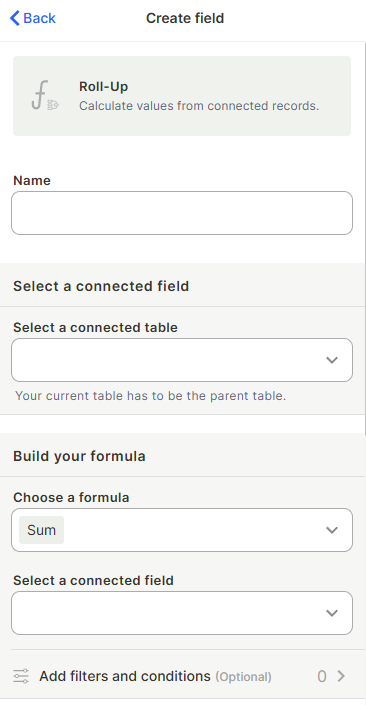
Name the field: Enter a name in the Name field to identify this field in your table.
Step 2
Select a connected table: Choose the child table whose records you want to aggregate. Your current table must be the parent in the relationship.
Step 3
Choose a formula: Select the aggregation formula to apply — for example, Sum, Count, Average, Min, or Max.
Step 4
Select a connected field: Choose which field from the connected table the formula will be applied to.
Step 5 (optional)
Add filters and conditions: Click Add filters and conditions to restrict which connected records are included in the calculation.
Step 6 (optional)
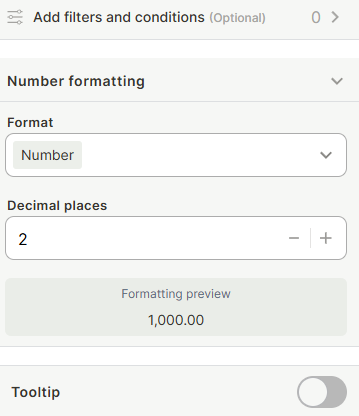
Configure number formatting: Expand Number formatting to set how the result is displayed (decimals, currency symbol, etc.).
Step 7 (optional)
Add a tooltip: Enable the Tooltip toggle and enter a short description to help users understand what this field represents.
Step 8
Create: Click Create to add the field to your table.
Keep in Mind
- This field does not aggregate from tables where your current table is the child — your current table must be the parent in the relationship.
- This field is read-only — users cannot manually enter or override the calculated value.
- Filters applied here only affect the Roll-Up calculation — they do not filter the connected records elsewhere in your table.
- This field does not work with text or select fields for formulas like Sum or Average — those formulas require a numeric field in the connected table.
FAQ
1 — What is the difference between Roll-Up and a formula field?
A formula field calculates values based on fields within the same record. A Roll-Up aggregates data across multiple records in a connected (child) table, pulling values from a relationship.
2 — Can I use Roll-Up to count connected records even if they don't have a numeric field?
Yes. The Count formula counts the number of connected records regardless of their field values, so no numeric field is required when using Count.
3 — What happens to the Roll-Up value if I delete a connected record?
The Roll-Up automatically recalculates and excludes the deleted record from the result.
4 — Can I add more than one Roll-Up field per table?
Yes. You can create multiple Roll-Up fields in the same table, each pointing to different connected tables or using different formulas and filters.
Updated 7 months ago