
Kanban Powers
Powers is the section inside Smart Kanban that controls what users can do with the kanban block. Each power either restricts or unlocks a specific interaction, letting you tailor the kanban experience for different audiences and use cases.
Capabilities
- Make the kanban read-only to prevent any data changes
- Allow users to download card data
- Disable drag and drop between stages
- Allow members to create and rename stages directly in the kanban
- Show or hide the options menu on each card
How to configure
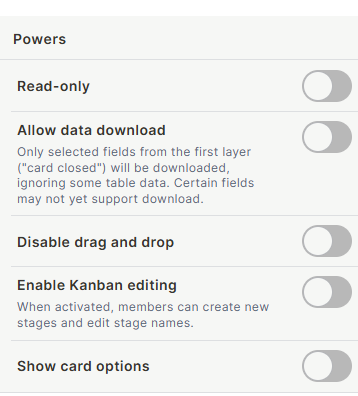
Read-only
When enabled, users can view the kanban but cannot create, edit, or move records. All interactive controls are hidden. Use this when the kanban is meant for monitoring only.
Allow data download
When enabled, users can download the data shown on cards. Only fields from the first layer (card closed view) are included in the download — fields visible only when the card is opened are not included. Some field types may not yet support download.
Disable drag and drop
When enabled, cards cannot be dragged between stage columns. Users can still open and edit records, but moving a card to a different stage must be done through the record form. Use this to prevent accidental stage changes.
Enable Kanban editing
When enabled, members can create new stages and edit existing stage names directly from the kanban board, without going to the table. Use this when the stage structure is expected to evolve and you want users to manage it themselves.
Show card options
When enabled, each card displays an options menu (a three-dot menu) with quick actions. When disabled, the options menu is hidden from cards.
Keep in Mind
- Read-only overrides other powers — even if Enable Kanban editing is on, enabling Read-only prevents all edits.
- Allow data download only exports fields visible on the closed card view. Fields that require opening the card are not included.
- Disable drag and drop only prevents stage changes via dragging — users can still change the stage field value by editing the record directly.
FAQ
1 — If I enable Read-only, can users still open a card to see its details?
Yes. Read-only prevents editing and creation but does not prevent users from opening a card to view its full record.
2 — What does Allow data download export — the whole table or just what's on the kanban?
It exports only the fields displayed on the card's closed (collapsed) view, and only for records currently visible in the kanban. Filters applied to the kanban affect what is exported.
3 — Can I give some users drag and drop access and restrict others?
Powers apply to the block as a whole, not per user. To restrict interactions for specific users, use Jestor's permission settings at the app or table level.
Updated 15 days ago