
Timer
The Timer field tracks elapsed time directly inside a record. You can start, pause, and stop the timer, record multiple laps, and see the total accumulated time — all without leaving the record.
For instructions on how to access field types or how to add one, see Field Types.
Capabilities
- Start, pause, and stop a timer directly from a record
- Record multiple time intervals (laps) within the same field
- Display the total accumulated time across all laps
- Track time per record for tasks, sessions, or production cycles
- Use the field to measure how long a stage, service, or activity takes
How to add a Timer field
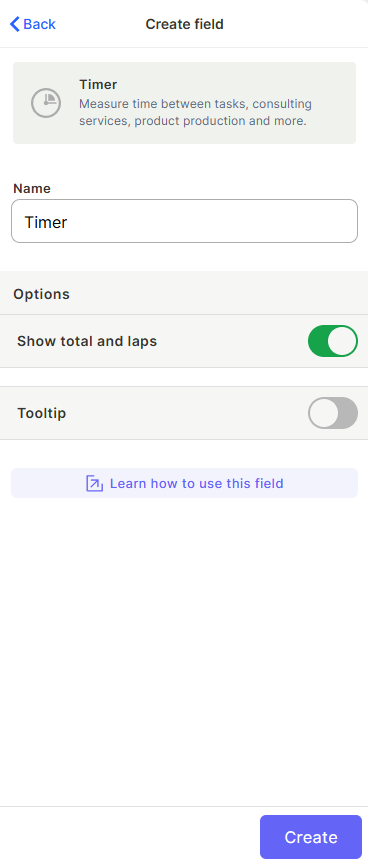
- Open your table and click + to add a new field.
- Select Timer from the field type list.
- Enter a name for the field.
- Optionally enable Show total and laps to display a breakdown of each recorded interval.
- Optionally enable Tooltip to add a helper text to the field.
- Click Create.
Use Cases and Examples
- In a "Consulting" table, use a Timer field to track billable hours for each client session.
- In a "Production" table, use it to measure how long each manufacturing step takes per order.
- In a "Tasks" table, use it to log how much time a team member spent working on each task.
- In a "Support" table, use it to record resolution time per ticket.
Keep in Mind
- The Timer field does not automatically calculate costs or billing — it only stores time. You would need a Formula or automation to derive a monetary value from the elapsed time.
- Each lap is recorded individually, but the timer does not associate laps with specific users — it tracks time on the record level.
- The timer must be manually started and stopped — it does not run on its own or trigger based on record changes.
- Disabling Show total and laps hides the lap breakdown but does not delete recorded laps.
FAQ
1 — Can I use the Timer field value in a formula or automation?
Yes. The total time recorded by the Timer field can be referenced in Formula fields and automations to perform calculations or trigger actions based on elapsed time.
2 — What happens to recorded laps if I disable "Show total and laps"?
The laps are not deleted — they remain saved in the field. Disabling the option only changes how the field is displayed.
3 — Can multiple people control the same timer on the same record?
Yes. Any user with edit access to the record can start, pause, or stop the timer. The field does not lock to a specific user.
4 — Does the timer keep running if I close the record or the app?
Yes. Once started, the timer continues running in the background regardless of whether the record is open.
Updated 6 months ago