
Quick Actions
Quick Actions is where you configure the shortcut buttons available throughout Jestor, allowing you to create records and items faster from anywhere in the platform.
This page covers the Quick Actions section of Settings. For instructions on how to access Settings, see the Settings page.

Capabilities
- Enable or disable standard quick action buttons
- Add tables to generate quick-create form shortcuts
Fields
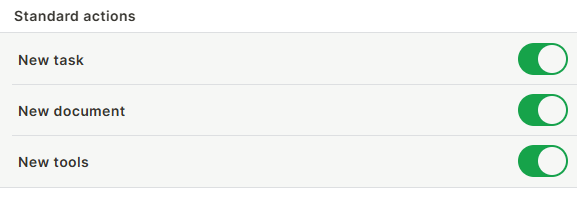
Standard actions — Toggle the default quick action buttons on or off:
- New task — Creates a new task.
- New document — Creates a new document.
- New tools — Creates a new tool.
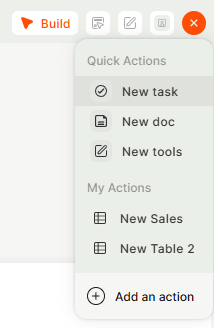
Select tables — Add tables to the quick actions menu. Jestor uses the table's structure to generate a form for quickly adding new records to that table from anywhere in the workspace. Click + Add item to select a table.
Keep in mind
- Standard actions are personal — toggling them on or off only affects your own quick actions menu, not other users.
- Quick action forms for tables are generated based on the table's current structure. If the table structure changes, review the form to make sure it still works as expected.
FAQ
1- Where do quick actions appear in Jestor?
Quick actions appear as a shortcut button accessible throughout the platform, so you can create tasks, documents, or records without navigating to a specific table or page.
2- Can I add more than one table to the quick actions menu?
Yes. You can add multiple tables via + Add item, and each one will have its own quick-create form in the menu.
Updated 6 months ago