
Automation Button
The Automation Button field adds a clickable button to each record in a table. When clicked, it triggers a connected automation for that specific record — without needing to open the record or navigate away.
For instructions on how to access field types or how to add one, see Field Types.
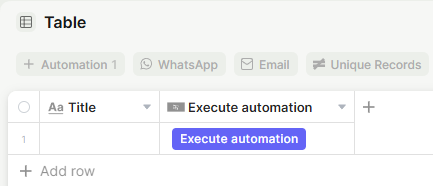
Capabilities
- Run any automation directly from a record with a single click
- Trigger record-specific actions, such as sending notifications, updating fields, or calling external services
- Customize the button with a label, icon, color, and optional tooltip
- Add multiple Automation Button fields to the same table, each connected to a different automation
Use Cases and Examples
- Sales teams can add a button that triggers an automation to send a proposal email to a client directly from their record, without leaving the table.
- Operations teams can place a button on a process record to kick off a multi-step automation — such as notifying a team, updating a status field, and logging a timestamp — all with one click.
- Support teams can use the button to trigger an escalation automation on a ticket record, routing it to the right person and updating the priority field automatically.
- Admins can add multiple Automation Buttons to the same table for different workflows — for example, one button to send a welcome message and another to archive the record.
How to configure
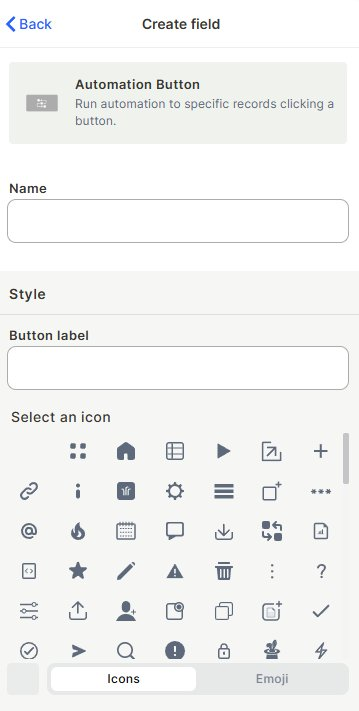
Step 1 — Name the field
Enter a name for the field. This is the internal label shown in the table header.
Step 2 — Style the button
- Button label: The text displayed on the button itself.
- Icon: Choose an icon from the grid (or switch to Emoji) to display alongside the label.
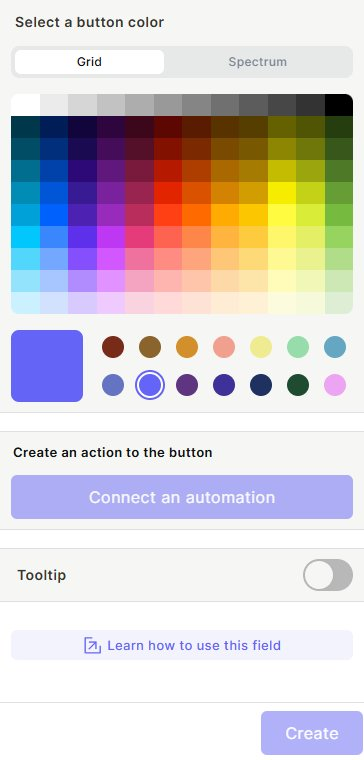
- Color: Pick a button color from the Grid or Spectrum palette.
Step 3 — Connect an automation
Click Connect an automation to link the button to an existing automation. The automation will run for the specific record the user clicks on.
To learn how to create an automation, see the Automations page.
Step 4 (optional) — Add a tooltip
Enable the Tooltip toggle to add a short description that appears when the user hovers over the button, explaining what it does.
Keep in mind
- The button does nothing until an automation is connected to it — clicking it before that has no effect.
- The button itself does not display any output or result from the automation — any feedback must be handled within the automation logic (e.g., updating a field, sending a notification).
- Changing the button's style (label, icon, color) does not affect the connected automation.
FAQ
1- Can I connect more than one automation to the same button?
No. Each Automation Button field can be connected to only one automation at a time.
2- Can I have more than one Automation Button field in the same table?
Yes. You can add multiple Automation Button fields to a table, each connected to a different automation.
Updated 7 months ago