
Date Range
The Date Range field lets users select a period between two dates with a single interaction. It references two existing Date fields — a start date and an end date — and is commonly used to power Gantt views and represent project timelines or availability windows.
For instructions on how to access field types or how to add one, see Field Types.
Capabilities
- Define a date period using a start and end date in one field
- Select date ranges with a visual calendar picker
- Power Gantt chart views by providing start and end boundaries
- Filter records by whether a date range overlaps with a given period
- Combine with other table fields to represent project timelines, vacation periods, reservations, and more
How to add a Date Range field
- Open your table and click + to add a new field.
- Select Date Range from the field type list.
- Enter a name for the field.
- Select the Start field — this must be an existing simple Date field in the same table.
- Select the End field — this must also be an existing simple Date field in the same table.
- Click Create.
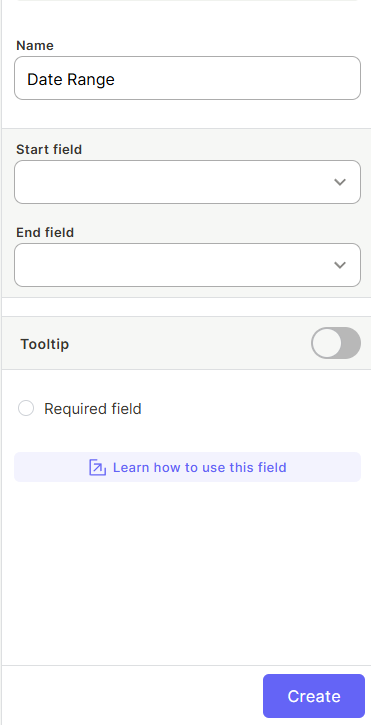
Note: You must create the two Date fields (start and end) before adding a Date Range field. The Date Range field does not create new date columns — it links to existing ones.
Use Cases and Examples
- In a "Projects" table, a Date Range field can represent the full duration of a project from kick-off to delivery, enabling a Gantt view.
- In an "HR" table, it can store employee vacation or leave periods.
- In an "Events" table, it can hold the start and end dates of a conference or event.
- In a "Rentals" table, it can capture the check-in and check-out dates for a booking.
Keep in Mind
- The Date Range field does not create new date columns — it links to two Date fields that already exist in the table. You must create the start and end Date fields first.
- If the start or end Date fields are deleted, the Date Range field will break and need to be reconfigured.
FAQ
1 — Do I need to create the start and end date fields before creating a Date Range field?
Yes. The Date Range field links to two existing Date fields in the same table. You must create both Date fields first before configuring the Date Range field.
2 — Can I use the Date Range field to create a Gantt view?
Yes. The Date Range field is the primary way to enable Gantt views in Jestor, as it provides the start and end boundaries needed to render timeline bars.
Updated 6 months ago