
Translate a text
Uses AI to translate text content from one language to another. It reads a text input, applies the selected target language, and saves the translated result to a field of your choice.
When to Use
- You receive content in multiple languages and need to standardize it in a single language
- You want to automatically translate user-submitted text, comments, or descriptions
- You are building a workflow that processes international data
How to Configure
Step 1
Create a new automation: This page covers only the action. For instructions on how to access automations and create a new automation, see the Automations page.
Step 2
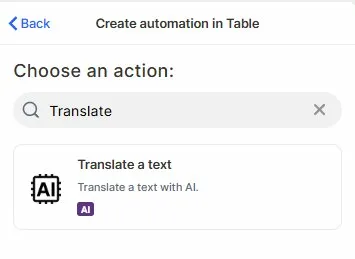
Choose the action: In the action search bar, type Translate and select Translate a text.
Step 3
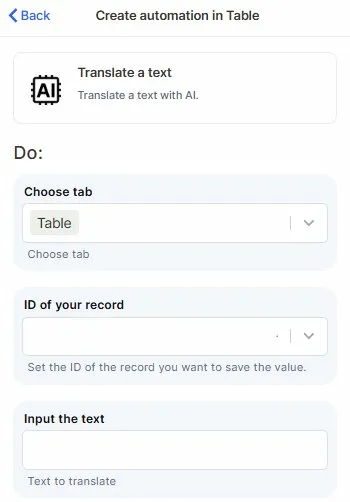
Choose tab: Select the table that contains the records you want to translate.
Step 4
ID of your record: Map the field that holds the ID of the record you want to update with the translated text.
Step 5
Input the text: Map the field or value containing the text you want to translate.
Step 6 (optional)
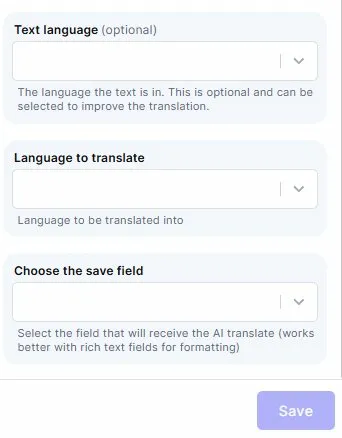
Text language: Select the language the source text is written in. This is optional but can improve translation accuracy.
Step 7
Language to translate: Select the target language the text should be translated into.
Step 8
Choose the save field: Select the field where the translated text will be stored. Rich text fields are recommended for better formatting.
Step 9
Save: Click Save to apply the automation.
Keep in Mind
- This action does not detect the source language automatically if left blank — providing the source language in the Text language field improves accuracy, especially for short or ambiguous texts.
- The translation result is saved as a single block of text in the selected field. It does not split the output into multiple fields or preserve complex formatting from the original.
FAQ
1 — Can I translate content from any language to any language?
The action supports a wide range of languages, but availability depends on the underlying AI model. For best results, always fill in the Text language field when the source language is known.
2 — Will the translated text overwrite the original content?
Only if you select the same field as both the source and the save field. To preserve the original, save the translation into a separate field.
Updated 7 months ago