
Duplicate Automation
For instructions on how to access automations and create a new automation, see the Automations page.
Capabilities
The Duplicate Automation feature lets you create an exact copy of any existing automation directly from the automations list — including all its triggers, actions, and configurations.
How to duplicate an automation
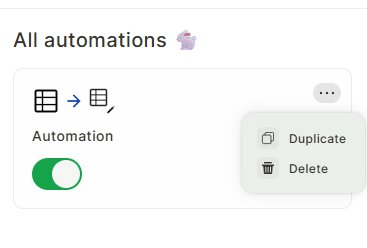
Step 1 — In the automations list, click the ... button on the automation you want to duplicate.
Step 2 — Select Duplicate.
Jestor will process the duplication in the background. For complex automations, this may take a moment — you'll receive a notification when it's complete.
The duplicated automation will appear in your list in a disabled state.
Use cases and examples
- You want to create a variation of an existing automation without rebuilding it from scratch.
- You need to test changes to an automation while keeping the original running.
- You want to reuse the same logic across different tables or contexts, using an existing automation as a starting point.
Keep in mind
- The duplicate is always created disabled, regardless of whether the original is active. This prevents the same logic from running twice by accident.
- Duplication runs asynchronously — Jestor notifies you when it's done, so you don't need to stay on the screen waiting.
- The Delete option is also available in the same ... menu, allowing you to remove automations directly from the list.
FAQ
1- Can I duplicate an automation that is currently active?
Yes. The original remains active and unaffected. Only the duplicate is created in a disabled state.
2- Will the duplicate have the same name as the original?
Yes, the duplicate is created with the same name. You can rename it after duplication.
3- Do I need to wait on the screen for the duplication to finish?
No. Jestor sends a notification when the process is complete, so you can continue working normally.
Updated 6 months ago