
WhatsApp Message Button
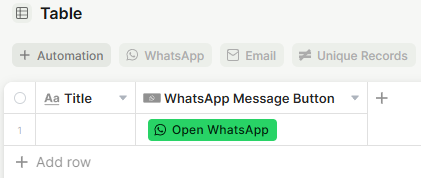
A button field that opens WhatsApp Web or the WhatsApp app with a pre-selected contact and an optional pre-filled message.
For instructions on how to access field types or how to add one, see Field Types.
Capabilities
- Links a record's phone number (or text field) directly to a WhatsApp conversation
- Pre-fills an opening message so users don't have to type it manually
- Displays as a customizable button with a label and color
- Supports an optional tooltip for extra context
Use Cases and Examples
- Sales teams can add the button next to a lead's phone number so reps can start a WhatsApp conversation in one click, with a standard opening message already filled in.
- Support teams can use it to quickly reach out to customers without leaving Jestor, reducing the steps needed to start a conversation.
- Operations teams can set up multiple WhatsApp Message Button fields in the same table — for example, one linked to a primary contact and another to a secondary contact.
How to set up
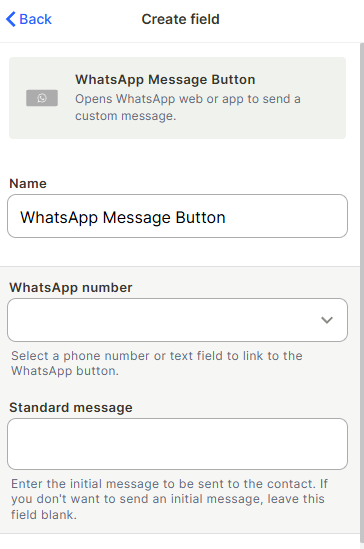
Step 1 — Name the field
Enter a name for the field. This is the label shown in the table header.
Step 2 — WhatsApp number
Select a phone number field or text field from the same table. This is the number that will be dialed when the button is clicked.
Step 3 (optional) — Standard message
Enter a message to pre-fill in WhatsApp when the conversation opens. If left blank, WhatsApp will open without any pre-filled text.
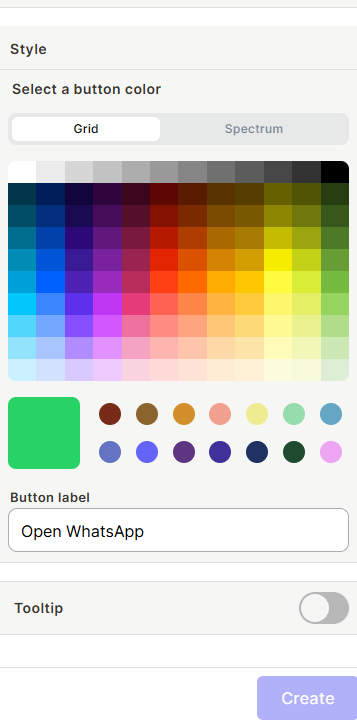
Step 4 (optional) — Style
Choose a button color using the Grid or Spectrum picker, and set a button label (default: Open WhatsApp).
Step 5 (optional) — Tooltip
Enable the tooltip toggle to show a short description when users hover over the button.
Step 6 — Save
Click Save to create the button
Keep in mind
- This field does not send messages automatically — it only opens WhatsApp with the contact and message pre-filled. The user still needs to click Send inside WhatsApp.
- It does not log or store the conversation history inside Jestor.
- If the linked phone number field is empty for a record, the button will not work correctly for that record.
- The standard message is the same for all records. It does not support dynamic values or variables pulled from other fields.
FAQ
1- Can I use a formula or lookup field as the WhatsApp number source?
Only phone number fields and text fields can be linked. Formula or lookup fields are not available as options.
2- Does the standard message change per record?
No. The standard message is fixed for the entire field. All records will use the same pre-filled message.
3- Can I have more than one WhatsApp Message Button field in the same table?
Yes. You can add multiple WhatsApp Message Button fields, each linked to a different phone number field or with a different standard message.
4- Does clicking the button open the WhatsApp app or WhatsApp Web?
It depends on the user's device and browser settings. On mobile, the native WhatsApp app typically opens. On desktop, Whatsapp Web will open.
Updated 7 months ago