
Clone Record Button
The Clone Record field adds a button to each record in a table. When clicked, it creates an exact copy of that record, including all field values.
For instructions on how to access field types or how to add one, see Field Types.
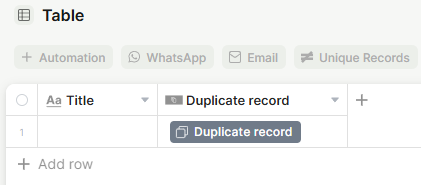
Capabilities
- Duplicates a record with all its current field values
- Optionally opens the newly created record automatically after duplication
- Supports a custom button label, icon, and color
- Supports a tooltip to guide users on what the button does
Use Cases and Examples
- Sales teams can duplicate a winning proposal record to use as a starting point for a similar deal, saving time on data entry.
- Operations teams can clone a recurring process record — such as an onboarding checklist or a standard contract — and adjust only what is different for each new case.
- Project managers can duplicate a template record at the start of each project cycle, keeping all default values intact and editing from there.
- Support teams can replicate a common ticket structure when similar issues come in repeatedly, avoiding redundant setup work.
How to set up
Step 1 — In your table, add a new field and choose Clone Record as the field type.
Step 2 — Set the Button label that will appear on the button in each row (e.g., "Duplicate record").
Step 3 — Optionally select an icon and a button color to match your workflow's visual style.
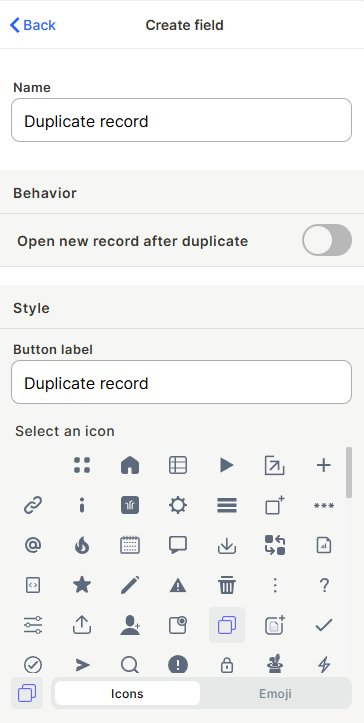
Step 4 — Enable Open new record after duplicate if you want the duplicated record to open automatically after creation.
Step 5 — Enable Tooltip if you want to display a hint when users hover over the button.
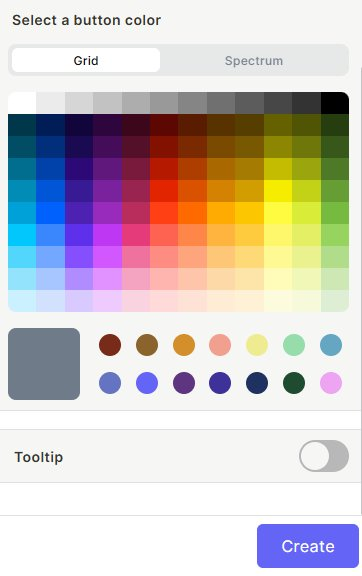
Step 6 — Click Create.
Keep in mind
- Enabling "Open new record after duplicate" does not prevent the duplicate from being created if the user dismisses the opened record.
- The button color and icon are visual only and do not affect the duplication behavior.
- The tooltip is not shown on mobile by default, since hover interactions are not available on touch screens.
FAQ
1- Does duplicating a record also duplicate its attachments?
Yes, attachments stored in the record are copied to the new record.
2- Can I have more than one Clone Record button in the same table?
Yes, you can add multiple Clone Record fields to the same table, each with different labels, icons, or colors.
3- Does the duplicated record keep the same ID as the original?
No, the duplicated record receives a new unique ID automatically.
4- Can I control who can use the Clone Record button?
Yes, access can be controlled through table permissions. Users without edit permissions on the table will not be able to trigger the duplication.
Updated 7 months ago