
Delete my Organization
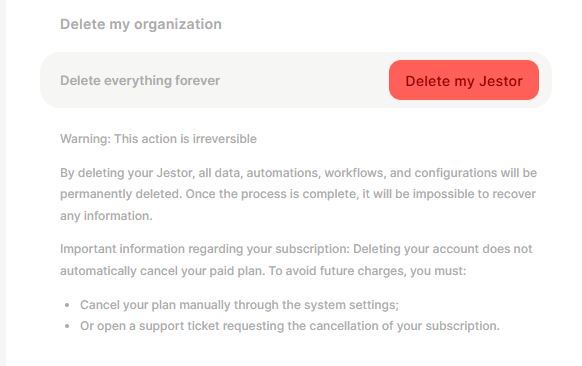
The Delete my Organization (Armageddon) feature permanently removes your entire Jestor workspace, including all data, automations, workflows, and configurations.
Capabilities
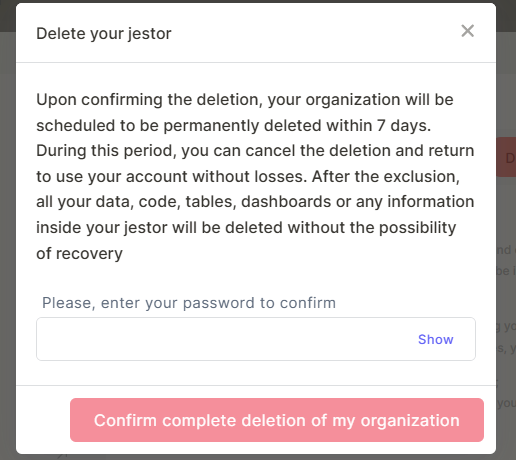
- Schedules your organization for permanent deletion within 7 days
- Allows cancellation of the deletion during the 7-day window
- After the 7-day period, permanently removes all data, tables, code, dashboards, automations, workflows, and configurations with no possibility of recovery
How to delete your organization
Step 1 — Go to Settings.
Step 2 — Scroll to the Delete my Organization section.
Step 3 — Click Delete my Jestor.
Step 4 — A confirmation modal will appear. Read the warning and enter your password in the field "Please, enter your password to confirm".
Step 5 — Click Confirm complete deletion of my organization.
After confirming, your organization is scheduled for permanent deletion within 7 days. During this period, you can still cancel the deletion and return to your account without any data loss.
Keep in mind
- Deleting your organization does not cancel your paid subscription. You will continue to be charged after deletion unless you cancel the plan separately. To avoid future charges, cancel your plan manually through system settings or open a support ticket.
- After confirming, deletion is not immediate — your organization enters a 7-day grace period during which you can still cancel and recover access without any data loss.
- After the 7-day period ends, all data is permanently deleted and cannot be recovered under any circumstances.
- You must enter your account password to confirm the deletion.
FAQ
1- Does deleting my organization cancel my subscription automatically?
No. Deleting your Jestor organization does not cancel your paid plan. You must cancel it manually through system settings or by opening a support ticket — otherwise charges will continue.
2- Can I recover my data after deleting the organization?
Only during the 7-day grace period after confirmation. Once the 7 days pass and the deletion is finalized, all data is permanently gone and cannot be recovered.
3- Who can delete the organization?
Only organization owners have access to the Delete my Organization option in Settings.
4- What happens to my team members after the organization is deleted?
All users lose access immediately. No notifications are sent automatically — it is recommended to inform your team before proceeding.
5- Can I cancel the deletion after confirming?
Yes, but only within the 7-day grace period. After that window closes, the deletion is finalized and irreversible.
Updated 6 months ago