
API and Tokens
Authentication and dedicated documentation.
In short
- What it is: an API token lets an integration read and write data in your Jestor through the API. Each token now has a role (permission) that decides what it can do.
- What changes: every token has a role, and you review and choose it yourself when you create a token or edit an existing one.
- Existing tokens: tokens created before this change keep working exactly as before, with an empty role.
- Keep in mind: the Super Root Admin role cannot be selected for a token.
Getting an API Token
For some simple integrations (such as using Zapier to connect jestor to other software), you may need an API token to authenticate the integration. If that's the case, you can get your API Token from the API Tokens page.
If you're looking for the dedicated API documentation, just click on the API Endpoints section on the header or click on the following link: (https://docs.jestor.com/reference)
API doc: https://docs.jestor.com/reference/getting-started-with-your-api
Token roles
A token can only do what its role allows. Use a role with only the access the integration needs (least privilege). This limits the impact if a token is leaked or shared by mistake, and lets you review and change each integration separately.
How to choose a role for a token
- In the left sidebar, open Automation. In the API group, click Token. You can also press Ctrl+K and search for API Token. The API Tokens page opens. The API group also has Tables, API Documentation and Webhook.
- Each token appears in the list with its name, a Copy token button and its status (for example, Active). To create one, click New API Token at the top right.
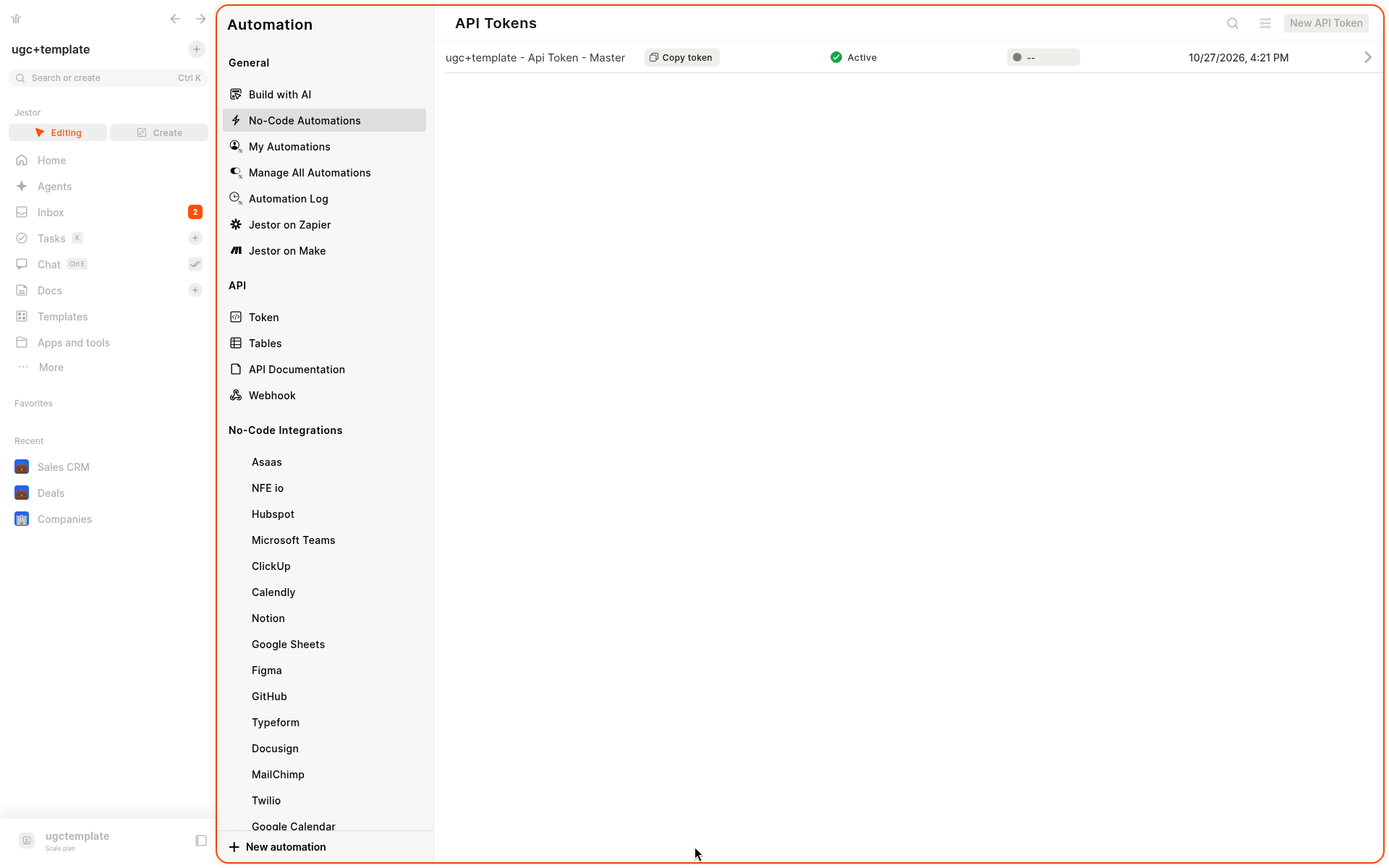
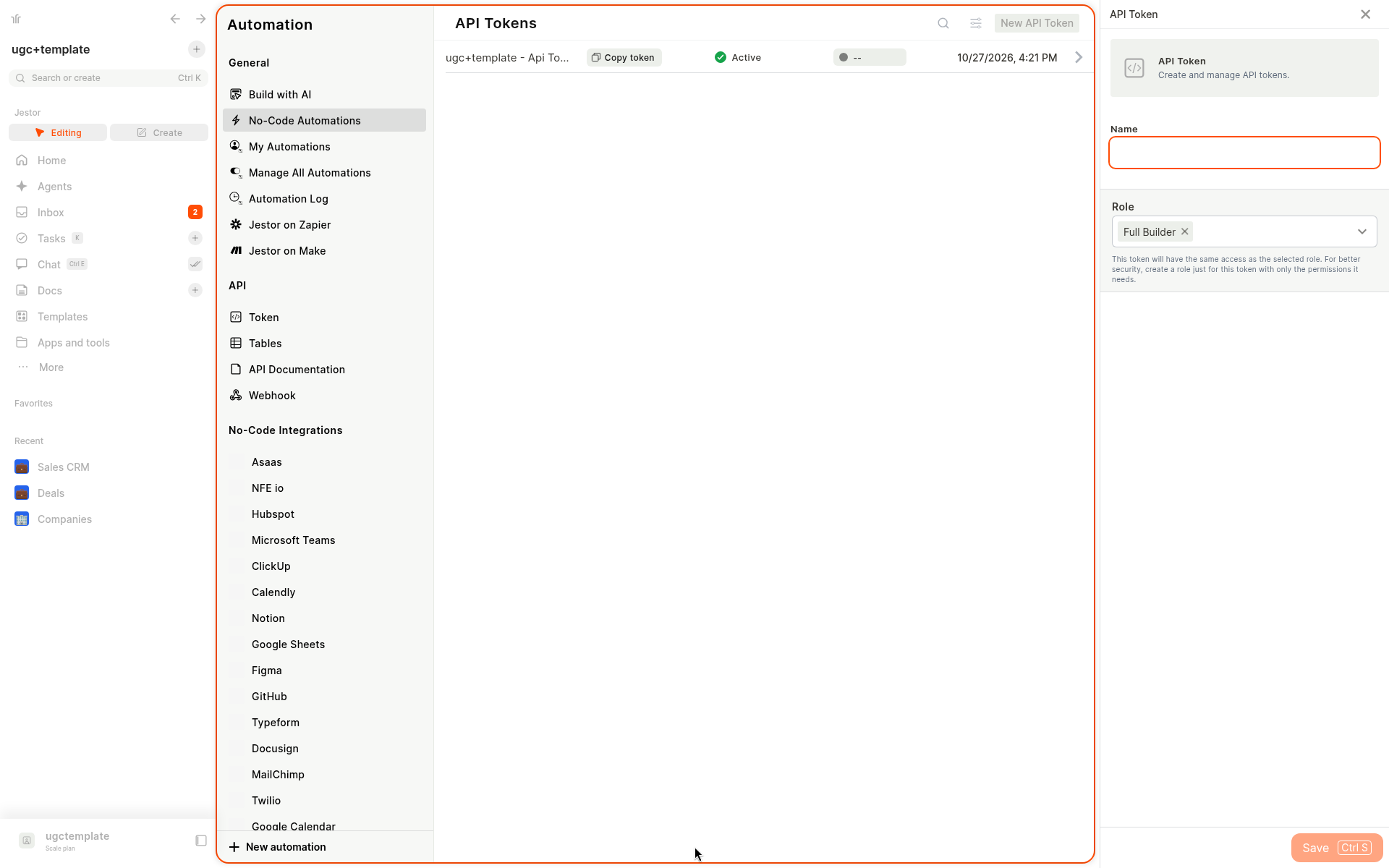
- A drawer titled API Token opens on the right. Type a Name for the token.
- In the Role field, review the role and select the role (or roles) the token should have. The choice is yours. The help text explains: "This token will have the same access as the selected role. For better security, create a role just for this token with only the permissions it needs."
- Click Save (Ctrl+S).
To edit an existing token, open it from the list, review the Role field, and save.
Review the role when you edit an existing tokenWhoever edits an existing token must explicitly select a role (permission) for it before saving. Always check the Role field and choose the access the token should have.
Create a role dedicated to the tokenThe Super Root Admin role cannot be selected for a token. If the integration needs a lot of access, you can create a powerful role instead. The best practice is to create a role dedicated to the token, with only the permissions the integration needs. You can create it straight from the Role list with New role.
What happens to existing tokens
Tokens created before roles were added keep working exactly as they did. Their role stays empty and nothing changes for the integrations that use them.
The next time you edit one of these tokens, you must select a role before you can save it.
Keep in mind
- The Super Root Admin role is not available for API tokens.
- Actions reserved for Super Root Admin, such as deleting tables or deleting the account, are not available to tokens.
- If an integration gets a permission error after you set a restricted role, review the role or use a role with more access.
- Roles do not manage users unless the role allows it. For API tokens, a role that does not manage users is usually what you want.
Related pages
FAQ
1. Do I need to change my existing tokens?
No. Existing tokens keep working as before, with an empty role. You only need to review and select a role when you edit one of them.
2. Is a role required for new tokens?
Yes. Every token needs a role. Review the Role field when you create a token and select the role the token should have.
3. Can I use the Super Root Admin role for a token?
No. Super Root Admin cannot be selected for an API token. If the integration needs broad access, create a role for it.
4. Which role should I choose?
Create or choose a role with only the permissions the integration needs. The best practice is a role dedicated to that token. You can create one from the Role list with New role.
5. What can a token not do?
A token cannot do more than its role allows. Actions reserved for Super Root Admin, such as deleting tables or deleting the account, are not available to tokens.
6. Will my integration break if I change the role?
It can, if the new role allows less than the integration needs. Change the role, then test the integration before relying on it.
Updated 1 day ago