
Card Options
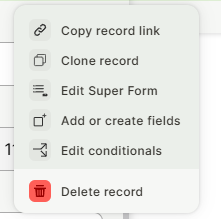
Card options controls whether the duplicate and delete shortcuts appear when a card is open.
Capabilities
- Remove the duplicate shortcut from an open card
- Remove the delete shortcut from an open card
- Apply the setting independently to each Card Form
How to configure
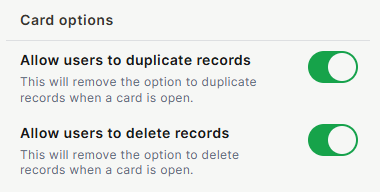
Allow users to duplicate records: When disabled, removes the option to duplicate the record from the open card.
Allow users to delete records: When disabled, removes the option to delete the record from the open card.
Keep in Mind
- Both toggles are enabled by default.
- Card options is only available for Card Forms. It does not appear when configuring an App Form or a Table Form.
- Disabling a toggle only removes the shortcut from that specific Card Form. It does not disable duplicating or deleting records elsewhere, such as the table view, other Card Forms connected to the same table, or through permission settings.
FAQ
1-If I disable Allow users to delete records on one Card Form, does it remove the delete option from the table view too?
No. The toggle only removes the shortcut from that specific Card Form. Users can still delete the record from the table view or from any other form connected to the same table, unless restricted there separately.
2-Does disabling these toggles change what users are allowed to do, or just hide the buttons?
It only hides the shortcut on that card. It is not a permission restriction. A user could still duplicate or delete the record through another form or view where the action is available.
3-Can I allow duplicating but block deleting on the same Card Form?
Yes. Allow users to duplicate records and Allow users to delete records are independent toggles and can be set differently on the same form.
Updated 7 days ago