
Notifications
Notifications is where you control when and where you receive alerts from Jestor.
This page covers the Notifications section of Settings. For instructions on how to access Settings, see the Settings page.
Capabilities
- Enable or disable email notifications for mentions
- Enable or disable in-app Jestor notifications for mentions
- Add emails to receive important system notifications
Fields
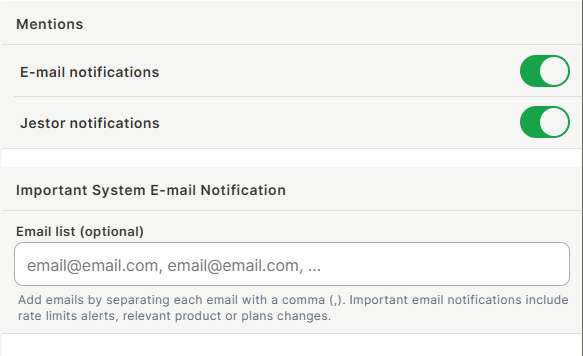
E-mail notifications — Toggle to receive an email when someone mentions you in Jestor. This is a personal setting — it only affects your own account and does not change notification behavior for other users.
Jestor notifications — Toggle to receive an in-app notification when someone mentions you in Jestor. This is a personal setting — it only affects your own account and does not change notification behavior for other users.
Email list (optional) — A comma-separated list of emails that will receive important system notifications, such as rate limit alerts and plan or product changes. This is separate from personal mention notifications.
Keep in mind
- The Mentions toggles only control notifications for mentions. Other types of notifications are not managed here.
- Emails added to the Email list receive system-level alerts, not personal mention notifications. Any email can be added — it does not need to belong to a Jestor user.
FAQ
1- If I turn off Jestor notifications, will I still receive emails for mentions?
Yes, the two toggles are independent. You can keep email notifications on while disabling in-app notifications, or vice versa.
2- Who receives the emails added to the system email list?
Anyone whose email is added to the list will receive important system notifications, such as rate limit alerts and plan changes, regardless of whether they have a Jestor account.
Updated 6 months ago