
Time
The Time field stores duration values, such as 00:00:12:020 or 2 minutes and 2 seconds. Use it to track elapsed time, task durations, response times, or any measurement expressed as a time interval.
For instructions on how to access field types or how to add one, see Field Types.
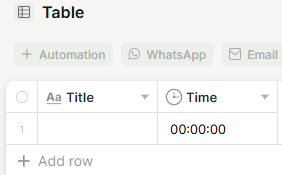
Capabilities
- Record how long something takes, such as task duration or logged hours
- Display the value in different formats: milliseconds, seconds, minutes, or text
- Use the value in formula or summary fields to calculate totals and averages
- Mark the field as required to ensure duration is always filled in
Use Cases and Examples
- Operations teams can log how long each step of a process takes per record, then use a summary field to calculate the total or average duration across all records.
- Support teams can track time spent resolving each ticket, making it easy to report on average resolution time.
- Project managers can record estimated and actual task durations in separate Time fields to compare planned versus real effort over time.
- Freelancers or service teams can use the field to log billable hours per client record and roll up the total with a summary field.
Field options
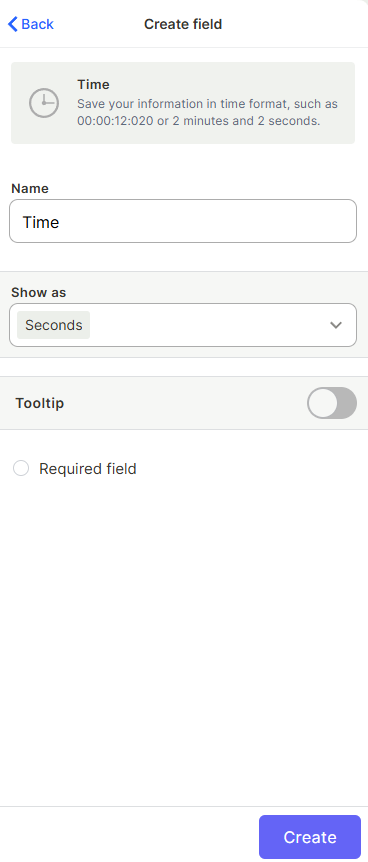
Show as
Controls how the value is displayed in the table. Options include Miliseconds, Seconds, Minutes, and Text.
Tooltip
Adds a help text shown when the user hovers over the field name.
Required field
Prevents saving a record if this field is left empty.
Keep in mind
- The Time field stores duration, not a time of day. Use a Date field if you need to record when something happened.
- The Show as setting changes how the value is displayed, but the underlying data is always stored the same way — changing it later won't affect existing values.
FAQ
1-Can I do math with Time field values, like summing durations?
Yes, you can use formula fields or summary fields to add or average duration values across records.
2-What format should I use when entering a value?
You can type in the format shown in the field (e.g., seconds as a number, or HH:MM:SS depending on the "Show as" setting).
3-Is there a maximum duration I can enter?
There is no documented maximum — the field supports large duration values.
Updated 7 months ago