
Bidirectional Connection (1:1)
The Bidirectional Connection (1:1) field connects one specific record from one table to exactly one record in a different table or kanban — and that connection works both ways. When A is linked to B, B is automatically linked to A.
For instructions on how to access field types or how to add one, see Field Types.
Capabilities
- Connect a record in one table to a single record in another table or kanban
- Automatically create a corresponding connection field in the target table
- Display selected fields from the connected record directly in the card view
- Customize the field button with an icon and color
- Mark the connection as required to enforce data integrity
How to create a Bidirectional Connection (1:1) field
- On table mode, click the + on the last table header or press F
- Select Bidirectional Connection (1:1)
- Enter a name for the field
- Under Select a table (or kanban), choose the table you want to connect to
- (Optional) Under Select displayed fields, add fields from the connected table to show when the card is opened for editing — do this for both sides of the connection
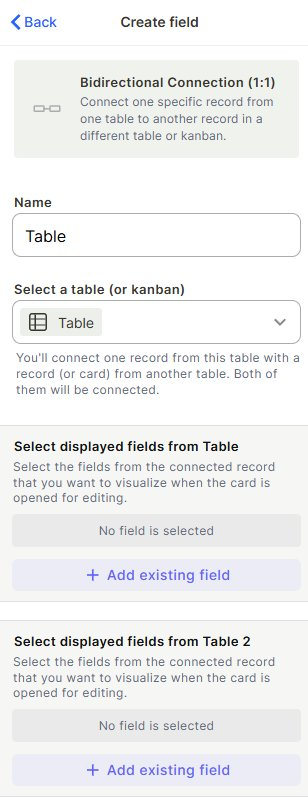
- (Optional) Customize the button style by choosing an icon and color

- (Optional) Enable Tooltip to add a hint for users
- (Optional) Check Required field to make the connection mandatory
- Click Create
Note: When you create this field, a new connection field is automatically created in the target table as well.
Use cases and examples
People and departments: Each employee belongs to exactly one department, and each department has one designated head — use a 1:1 connection to reflect that exclusive relationship in both tables.
Orders and invoices: Each order generates exactly one invoice. A 1:1 connection keeps both records linked without duplication.
Projects and project managers: When each project is assigned to exactly one manager (and each manager owns exactly one project at a time), a 1:1 connection enforces and reflects that rule on both sides.
Keep in mind
- This field does not allow one record to connect to multiple records — for that, use a regular Connection field (1:N)
- Connecting a record that is already linked to another record will replace the existing connection, not add to it
- Deleting a connection on one side removes it on both sides automatically
- The field created in the target table is part of the same bidirectional relationship — deleting one side deletes both
- You cannot connect a table to itself using this field type
FAQ
1- What's the difference between a Bidirectional Connection (1:1) and a regular Connection field?
A regular Connection allows one record to link to many records (1:N). The 1:1 version restricts both sides to a single linked record — neither table can have more than one connection per record.
2- Can I connect a record in Table A to a record that is already connected to another record in Table A?
No. Since each record can only be connected to one other record, assigning a new connection replaces the previous one.
3- Can I display fields from the connected record without opening the linked table?
Yes. When creating or editing the field, use Select displayed fields to choose which fields from the connected record appear when the card is opened for editing.
4- Does the 1:1 connection work with kanbans as well?
Yes. You can connect a table record to a kanban card using this field type.
Updated 6 months ago