
Embed Block
The Embed block displays external content (a webpage, a Google Doc, a PDF, or any other link), directly inside a form, without the person having to leave Jestor.
In short
- What you can do: display any public link inside a form; preview the link before saving to confirm it renders correctly; show or hide the block's title.
- Keep in mind: The Embed block does not sync or import data from the linked page into Jestor.
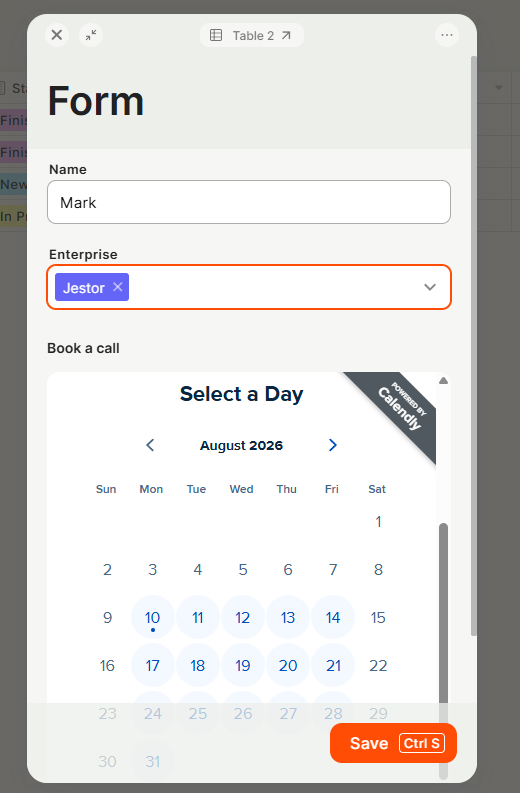
For instructions on how to add blocks, see the Blocks page.
Capabilities
- Display any public link inside a form.
- Preview the link before saving to confirm it renders correctly.
- Show or hide the block's title.
- Set a custom color for the title.
- Set a background color for the embed window, or make it transparent.
- Add a border and choose its color.
- Choose between rounded or square corners.
- Combine with form conditionals to show a different embed depending on the person's answers.
Use Cases and Examples
Embedding a live currency exchange page inside a form so the person filling it out has that context without leaving Jestor.
Embedding a Google Doc, PDF, or reference page related to the record being filled out.
Combining the Embed block with form conditionals: showing one embed for small clients and a different one for large clients, based on an answer such as number of employees. This is done by setting a condition on the field (for example, "number of employees") and pointing each condition to a different Embed block.
Hiding the title so the embedded content looks native to an external site where the form is being shown, instead of looking like a Jestor block.
Setting up the Embed block
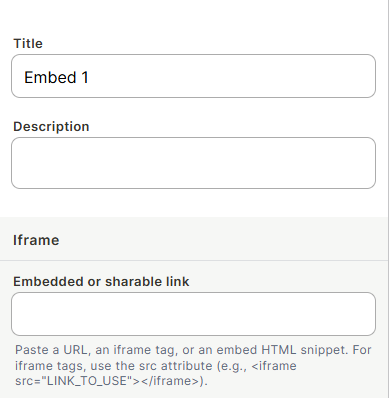
Step 1: Paste the link you want to display into the embed field.
Step 2 (optional): Check the preview to confirm the link renders correctly. Not every website can be embedded.
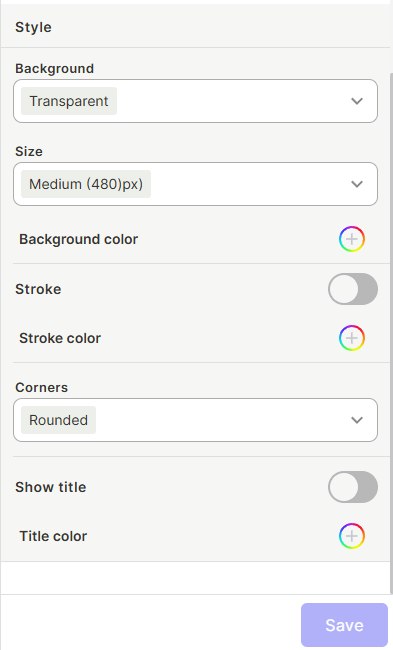
Step 3 (optional): Configure the appearance: window size, background or transparency, border color, corner style, and title visibility/color.
Configuration options
Window size: increase or decrease the size of the embed window.
Background: choose a solid color, or make the background transparent, useful when the form is embedded on an external site and you want it to blend with the page.
Border: add a border and pick its color, or leave the embed without one.
Corners: choose rounded or square corners for the embed window.
Title: show or hide the block's title, and set a custom color for it.
Keep in mind
- The Embed block does not sync or import data from the linked page into Jestor. It only displays the page's live content each time the form is opened.
- Not every website can be embedded. Some pages block embedding (for example, via X-Frame-Options), so the link may fail to display even though it opens normally in a browser tab.
- Hiding the title does not hide the embedded content itself, only the title label is hidden.
- Making the background transparent does not remove the border: the border is a separate setting and must be turned off independently.
- The Embed block does not replace an automation. It only displays a link; it does not fetch, process, or react to data.
- The Embed block can´t display a Jestor public link
FAQ
1-Can I embed any link?
Most public links work, but some websites block embedding and won't display inside the block. Test the link's preview before saving.
2-Can I show a different embed depending on the person's answers in the form?
Yes. Use form conditionals to display a specific Embed block based on the value of another field.
3-Does the embedded content update automatically?
Yes. The block always shows the live version of the linked page each time the form is opened. It does not create a stored copy of the content.
4-Can I hide the block's title?
Yes. The title can be shown or hidden, and its color can be customized independently.
5-Can I make the background transparent?
Yes. This is especially useful when the form is embedded on an external website, so the block blends with the page instead of showing its own background color.
6-Can I add a border around the embed?
Yes. You can add a border, choose its color, and choose between rounded or square corners.
7-Can I use this with files other than webpages, like Google Docs or PDFs?
Yes. Any link that can be embedded via a URL works, including Google Docs, PDFs, and other document links.
Updated 1 day ago