
Link Button
A field that displays a clickable button inside a table record. The button can open an external URL or a custom Jestor link, and can be fully styled with a label, icon, and color.
For instructions on how to access field types or how to add one, see Field Types.
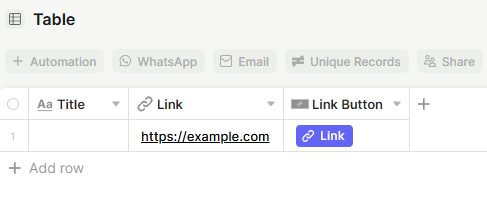
Capabilities
- Display a button that opens an external URL or a Jestor internal link
- Pull the URL dynamically from a Link or Formula field in the same table
- Set a custom label for the button text
- Add a tooltip that appears when the user hovers over the button
Use Cases and Examples
- Sales teams can add a Link Button pointing to a CRM record or proposal URL stored in each lead's row, letting reps open the right page in one click.
- Operations teams can use a Formula field to build dynamic URLs — such as a tracking link or an external dashboard filtered by record ID — and surface it as a button.
- Support teams can link directly to a ticket in an external tool (like Zendesk or Jira) from the corresponding record in Jestor.
- Any team managing documents can add a button that opens the relevant Google Doc, Notion page, or file link stored in a Link field for that record.
How to set it up
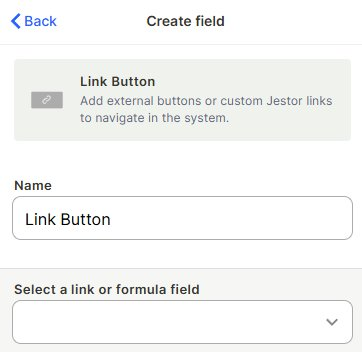
Step 1 — Name the field
Enter a name for the field. This name appears as the column header in the table.
Step 2 — Select a link or formula field
Choose which field in the table contains the URL the button should open. This must be a Link or Formula field that outputs a valid URL.
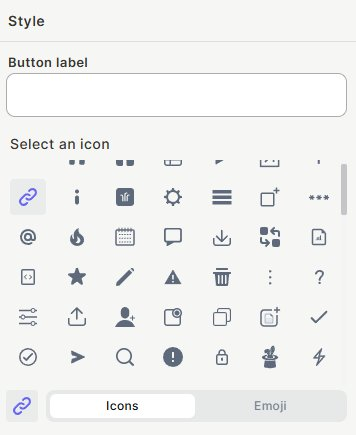
Step 3 (optional) — Set a button label
Enter the text that will appear on the button. If left empty, only the icon is shown.
Step 4 (optional) — Select an icon
Choose an icon or emoji to display on the button. Switch between the Icons and Emoji tabs to browse options.
Step 5 (optional) — Select a button color
Pick a color from the grid or use the Spectrum tab for a custom color.
Step 6 (optional) — Enable tooltip
Toggle Tooltip on to show a brief description when the user hovers over the button
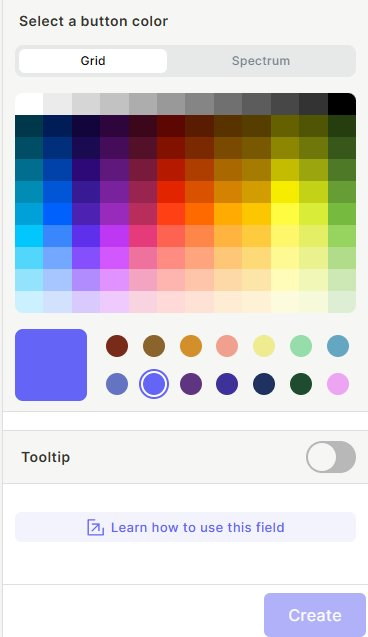
Step 7 — Save
Click Save to create the button
Keep in mind
- The Link Button does not store a URL itself — it only reads the URL from another field. You must have a Link or Formula field in the table for the button to work.
- The button does not track clicks or log any interaction history.
- The button color and label are the same for every record in the table — they are not dynamic per row.
FAQ
1- Can the button open different URLs for each record?
Yes. Since the URL is pulled from a Link or Formula field, each record can have a different URL in that field, so the button will open a different destination per row.
2- What happens if the linked field is empty for a record?
The button will still appear, but clicking it will not navigate anywhere since there is no URL to open.
3- Can I have more than one Link Button in the same table?
Yes. You can add multiple Link Button fields, each pointing to a different Link or Formula field.
Updated 7 months ago