
Random ID
The Random ID field automatically generates a unique identifier for each record in your table, following a rule you define.
For instructions on how to access field types or how to add one, see Field Types.
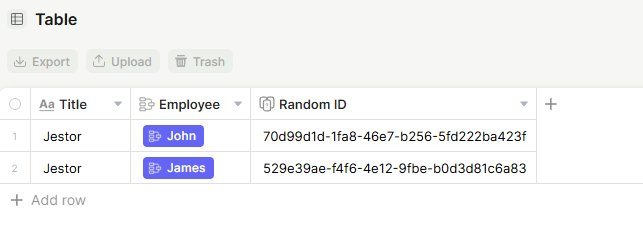
Capabilities
Generate unique IDs automatically for every new record
- Choose between multiple generation rules (UUID, sequential, date-based, random)
- Combine fixed text with sequential numbers to create custom patterns
- Use date-based IDs (year, month, day) for time-sensitive records
- Ensure no duplicates are created within the same field
- Serve as a unique key for spreadsheet imports, enabling record updates without relying on the title field
- Work as the ticket identifier in emails sent from the table, replacing the default sequential ID in the subject line
- Generate secure codes for public update forms, preventing users from guessing record identifiers
Generation rules
Each rule has its own set of configuration fields. Below is what each one generates and what you need to fill in.
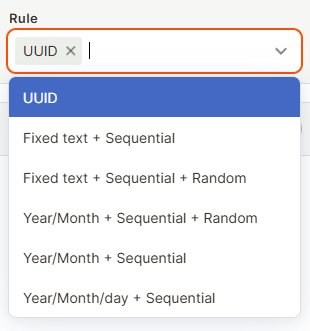
UUID
Generates a universally unique identifier automatically. No additional configuration is required.
Example: 70d99d1d-1fa8-46e7-b256-5fd222ba423f
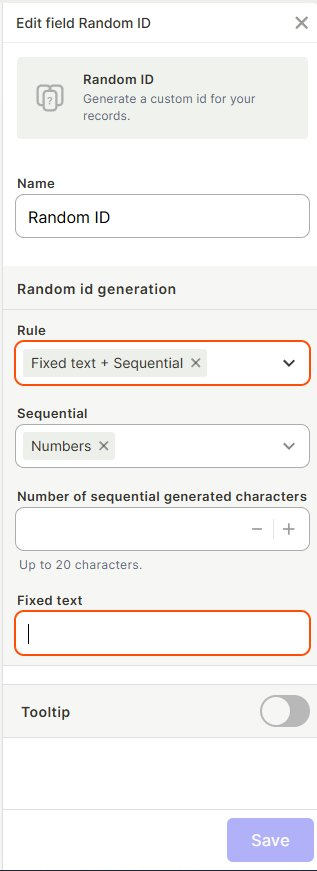
Fixed text + Sequential
Combines a custom prefix with a sequential number.
- Sequential: defines the type of sequential characters (e.g., Numbers).
- Number of sequential generated characters: sets how many characters the sequential part will have (up to 20).
- Fixed text (required): the prefix that will appear before the sequential number.
Example: with Fixed text TKT- and 3 sequential characters → TKT-001, TKT-002
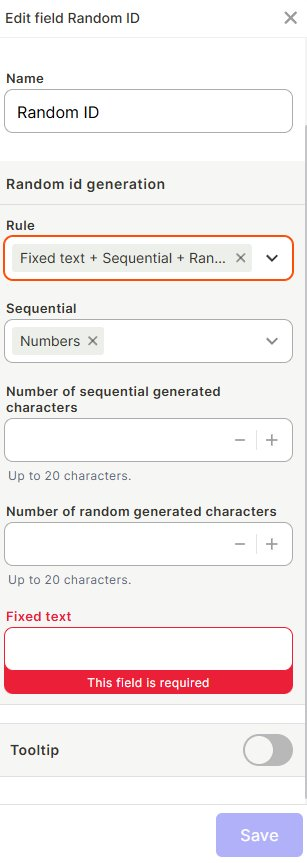
Fixed text + Sequential + Random
Combines a custom prefix, a sequential number, and a random string.
- Sequential: defines the type of sequential characters.
- Number of sequential generated characters: sets the length of the sequential part (up to 20).
- Number of random generated characters: sets the length of the random part (up to 20).
- Fixed text (required): the prefix that will appear at the beginning.
Example: with Fixed text ORD-, 3 sequential, and 4 random → ORD-001-X7A2
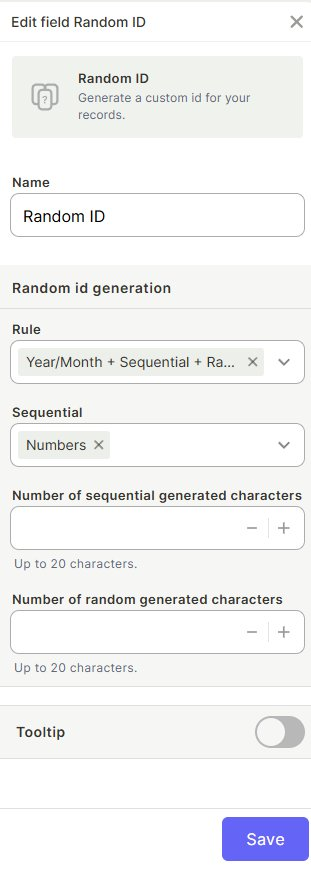
Year/Month + Sequential + Random
Uses the current year and month plus a sequential number and a random string.
- Sequential: defines the type of sequential characters.
- Number of sequential generated characters: sets the length of the sequential part (up to 20).
- Number of random generated characters: sets the length of the random part (up to 20).
Example: with 3 sequential and 4 random → 2026-04-001-X7A2
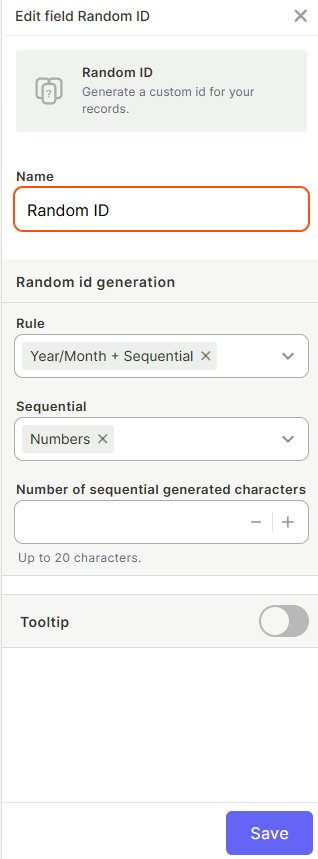
Year/Month + Sequential
Uses the current year and month plus a sequential number.
- Sequential: defines the type of sequential characters.
- Number of sequential generated characters: sets the length of the sequential part (up to 20).
Example: with 3 sequential characters → 2026-04-001
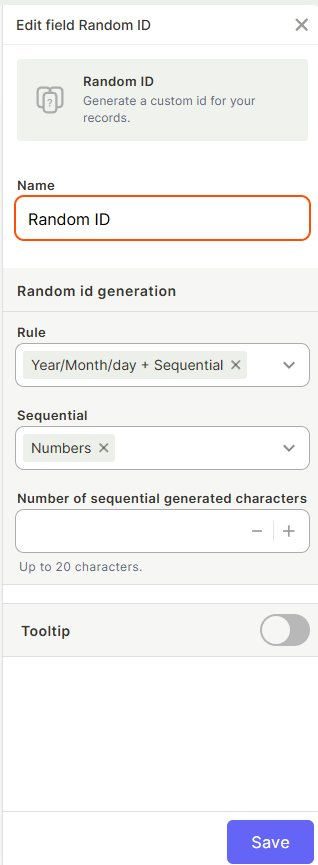
Year/Month/day + Sequential
Uses the current year, month, and day plus a sequential number.
- Sequential: defines the type of sequential characters.
- Number of sequential generated characters: sets the length of the sequential part (up to 20).
Example: with 3 sequential characters → 2026-04-22-001
How to set up
Step 1: Add a new field to your table and select Random ID as the field type.
Step 2: Name the field (e.g., "Random ID").
Step 3: Under Random id generation, choose the Rule that fits your use case.
Step 4 (optional): Enable Tooltip to display a helper message when users hover over the field.
Step 5: Click Save.
Use cases and examples
- Ticket process: use
Fixed text + Sequentialwith the prefixTKT-to generate IDs likeTKT-001,TKT-002, making it easy to reference and track each ticket throughout its workflow. - Dated tickets: use
Year/Month + Sequentialto automatically tag tickets with the period they were opened (e.g.,2026-04-001), helping organize and report on tickets by month. - Secure ticket IDs: use
Year/Month + Sequential + Randomto create IDs that are both date-based and hard to guess — useful for external-facing tickets. - Internal record IDs: use
UUIDto generate globally unique identifiers for integrations with external systems. - Spreadsheet imports for data updates: use the Random ID field as the unique key when importing a spreadsheet to update existing records. Unlike the random code from the title field, the Random ID field is supported by the importer and ensures each row is matched to the correct record.
- Ticket codes in emails: when tickets are sent via email from a table, use the Random ID as the ticket identifier in the subject line instead of the default sequential number. This prevents users from guessing other ticket IDs and accessing tickets that aren't theirs.
- Update forms: use a Random ID instead of the title as the identifier in public update forms. Because the value is randomized, users cannot guess the pattern to access other records, making the form significantly more secure.
Keep in mind
- The Random ID value is generated automatically and cannot be edited manually.
- Sequential rules restart their counter per field, not per table.
- Deleting a record does not free up its sequential number — the counter keeps moving forward.
- The Random ID field does not guarantee uniqueness across different tables, only within the same field.
- A table can have up to three Random ID fields.
- When the field is added to a table that already has records, existing rows are filled in automatically — this may take some time on large tables.
FAQ
1-Can I change the generation rule after records have already been created?
Yes, but existing records will keep the IDs generated under the previous rule. Only new records will follow the new rule.
2-Can I edit a Random ID value manually?
No. Random ID values are generated automatically by the system and cannot be edited.
3-What happens if I delete a record — does its ID get reused?
No. Sequential counters do not reuse deleted IDs; they always move forward.
4-Is the UUID rule truly unique?
Yes. UUIDs are designed to be globally unique, making them safe for use in integrations and external systems.
5-Can I use a Random ID field as the primary identifier of my table?
Yes. Random ID fields are commonly used as stable, unique identifiers for records.
6-Does the sequential counter reset each year or month?
No. The sequential counter is continuous and does not reset automatically, even for date-based rules.
7-Can I use the Random ID field to update records when importing a spreadsheet?
Yes. The Random ID field can be used as the matching key in the importer, which the title field's random code cannot.
8-Can I use the Random ID in the subject of ticket emails sent from the table?
Yes. The Random ID can replace the default sequential ID in ticket emails, providing a standardized and less predictable identifier.
9-How many Random ID fields can I have in the same table?
Up to three Random ID fields per table.
Updated 6 months ago