
Title
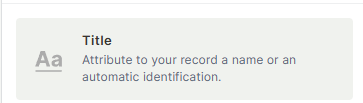
The Title field is the default field automatically created when you add a new table. It cannot be deleted and serves as the primary identifier for each record. It is also used as the unique record ID when connecting tables to each other.
For instructions on how to access field types or how to add one, see Field Types.
Capabilities
- Identify each record with a unique name, label, or code
- Act as the primary display value when records are referenced in connected tables
- Store sequential IDs, random codes, or descriptive names
- Serve as a human-readable record identifier across the platform
Use Cases and Examples
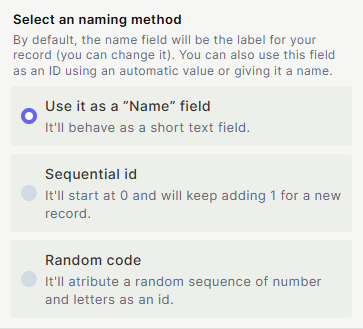
As a name field — use the Title to give each record a descriptive label:
- In an "Inventory" table, the Title can store the name of each product.
- In an "Events" table, it can hold the name or description of each event.
As a sequential ID — use the Title to number records in order:
- In a "Sales" flow, the Title can register the order number (e.g., #001, #002).
- In a "Support" table, it can track ticket numbers in sequence.
As a random code — use the Title to assign unique codes to records created constantly:
- In a "Bug Tracker" flow, the Title can store the unique ID of each bug report.
- In a "Shipments" table, it can hold a tracking code for each shipment.
Keep in Mind
- The Title field cannot be deleted or replaced by another field.
- When configured as Sequential ID or Random Code, values are generated automatically by Jestor and cannot be manually edited.
- When configured as a Name field, the value must be entered manually by the user.
- When a table is connected to another, the Title field is what appears as the display value in the connected field.
FAQ
1 — Can I rename the Title field?
Yes. You can rename it to anything that fits your table, such as "Product Name", "Order Number", or "Bug ID". Renaming it does not affect its behavior.
2 — Can I make the Title field auto-populate with a sequential number or code?
Yes. When you configure the Title field as a Sequential ID or Random Code, Jestor automatically generates the value when a record is created. These values cannot be manually edited.
3 — What happens to the Title field when I connect two tables?
When you create a connection between tables, the Title field of the connected table is used as the display value. By default, it is what users see when selecting or viewing a linked record.
4 — Can I have more than one Title field in a table?
No. Each table has exactly one Title field. You cannot add a second one or convert an existing field into a Title field.
Updated 6 months ago